
|
Table of Contents
|
Are you here to learn about Netboard? Chances are, if you've stumbled upon this article, you're either looking for a password or on your way to find one. So… here's our suggestion for reading this onboarding guide:
- If you are already familiar with Wikidot, just read Frequently Asked Rules Questions and the sections that follow;
- If this is your first time using Wikidot, it's best to read this entire article from start to finish;
- If you don't have much patience, feel free to jump toFrequently Asked Rules Questions and come back to find the relevant section here when you run into issues while using the site.
Now, take your time scrolling down to find the password — enough with the small talk, let's get straight to it!
Registration/Access Issues You May Encounter on Wikidot
What? Already stuck at account registration or unable to access the site? Then take a look at this section first!
If the tutorial here doesn't answer your question and you're unable to post feedback on the Feedback Center, you can Contact other admins.
Didn't receive the registration email — not even in spam or the "other" inbox…
Due to Wikidot's risk control mechanisms, some email providers may be flagged as invalid, or you may not receive the verification code. We recommend trying a different email address. Here are our suggestions:
- First choice: Use a non-Outlook international email provider, such as Gmail or Proton;
If you don't have an email address that meets the above criteria, we suggest searching for "temporary email" in your browser's search bar (e.g., Bing), and try different temporary email services until you find one that works for registration. Once you've successfully registered with a temporary email, go to your account settings and change it to your current primary email address.
The site layout… looks kind of off?
Try changing “http://” to “https://” in the address bar. If that doesn't work… would you like to submit a report?
What Can I Write in a Blog?
Here, you can turn anything from your daily life into a blog post. Whether it's a mundane moment like choking on water, a piece you've just written, or even… the sheer boredom of proving that every user is an alt of the site admin (what am I even saying).
Anyway! You can write about whatever you want, but certain prohibited content is not allowed. Most of the rules have already been outlined on the "Join the Site" page, so we won't repeat them here.
For privacy reasons… please avoid embedding sensitive modules like a member list or recent edits list in your blog posts.
Common Technical Questions
Tags? How Do I Use Them?
You can add tags to your blog posts. Simply click "Edit Tags" in the "Tags" section after publishing your post.
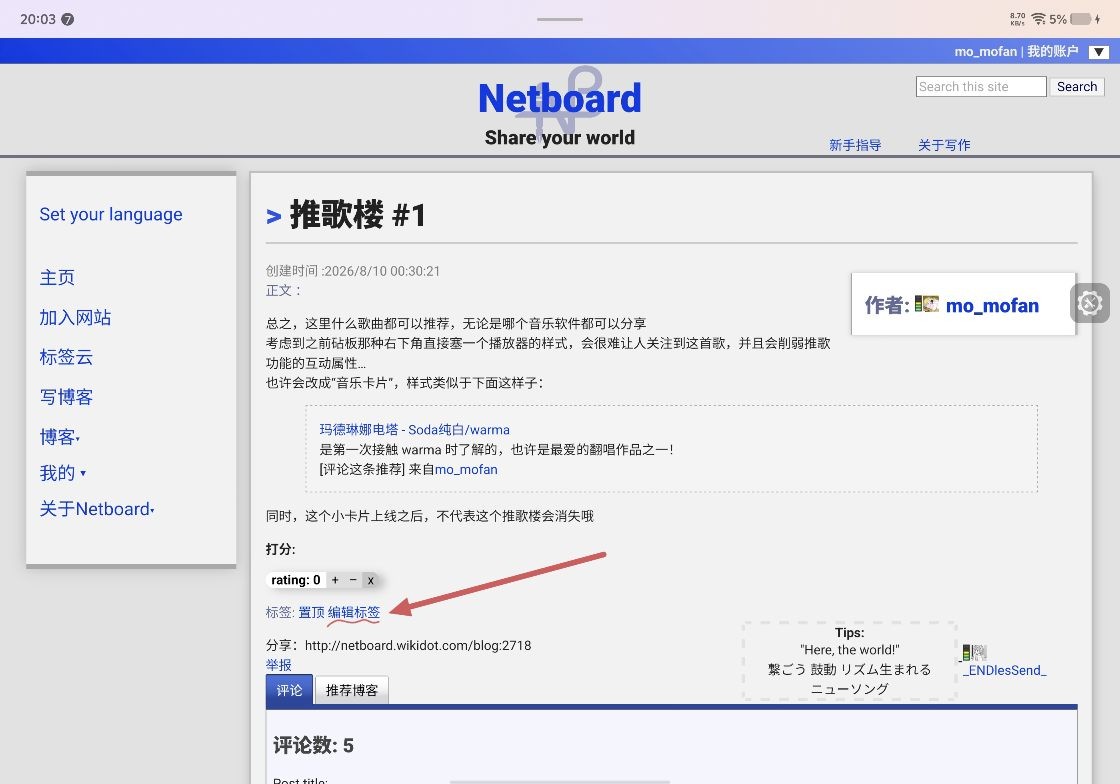
Here are some special tags:
- 隐藏|hidden — Hides your blog from the site homepage and your personal profile. Please note that others can still view it using special technical methods.
- 限制级|NSFW — Marks content as unsuitable for readers aged 15 and under.
- 版式|theme — Used for sharing CSS themes
- 置顶|sticky — Pins your blog to the top of the homepage for announcements and events. Admins only.
- 更新日志|log — Used to document site updates. Admins only.
How Do I Post Images? Why Are My Images So Large?
On Wikidot, there is currently no built-in image upload feature. You'll need to upload your images to an image hosting service. We currently recommend Imgchr (registration required) and Postimages.
After uploading, copy the "Image URL" and insert it using the following format:
[[image image_url class="img"]]For example:
[[image https://scp-wiki.wdfiles.com/local--files/scp-001/fractal-mka.jpeg class="img"]]
File name: fractal-mka.jpeg
Image title: Feather fractal
Image author: Kevin Dooley
License: CC BY 2.0
Source link: Flickr
If your image is too large, this is a Wikidot limitation. We recommend using the class="img" attribute on Netboard1 to let the site handle sizing automatically. Alternatively, you can manually adjust the image width using the "width" attribute.
When posting images in the comments, we recommend using the [[collapsible]] format to collapse the image; otherwise it will take up a lot of screen space.
So Much Messy Code… How Do I Write in Wikidot Syntax?
If you're only commenting or publishing blog posts, the basic Wikidot syntax (as covered in the SCP Foundation's Wiki Syntax page) should be more than enough. If you need more advanced formatting, check out Advanced Formatting and You.
Unless you're planning to create your own site, you generally don't need to dig into the official Wikidot documentation — after all, even the admins here haven't fully figured it out either.
Frequently Asked Rules Questions
It's Kind of Annoying to Use, and There Are So Many Bugs… What Should I Do?
If you have good ideas or suggestions, feel free to send an email to Asaerror with the subject line "I have a suggestion for the site" — otherwise it might get filtered out as spam. Alternatively, you can also post your suggestions on the Feedback Center.
I Just Finished a Site — Can I Go Out and Promote It?
You're welcome to promote your site here! Just make sure to pick a good piece of content from your site to showcase — for example, DDoS Attack is a great example.
Can I Rate My Own Blog?
Self-rating is allowed here — think of it as liking your own post on social media. However, during events or contests, rating your own entries (whether with your main account or alts) is prohibited. After all… you wouldn't want everyone to know you're padding your score, would you?
Oh, and by the way, the password is…
netboardYou can now join the site!
A Few Admins You Might Want to Know
Here are a few people you should know:
Netboard-robot: Our site's bot for posting event announcements
Floating_cloud08: Our site's tech support
Asaerror: A Touhou fan
mo_mofan: Also known as Mofan / 22c. Has a playlist full of Vocaloid tracks. Currently in high school.
Well… that's it for the beginner's guide. Now, let your wonderful journey here begin!